

Mark a line finished, and reopen it
PlanStandard and Professional
When the work on a line is done and paid for, mark it as finished. The line then shows what it really cost, with the Actual badge. If something changes later, you can reopen it.
Steps
To mark a line finished:
- Go to Stages. On a desktop, choose Stages in the menu on the left. On a phone, tap the Budget tab at the bottom of the screen, then the Stages tab at the top.
- Find the line you want to finish.
- Choose More on the line, next to Edit.
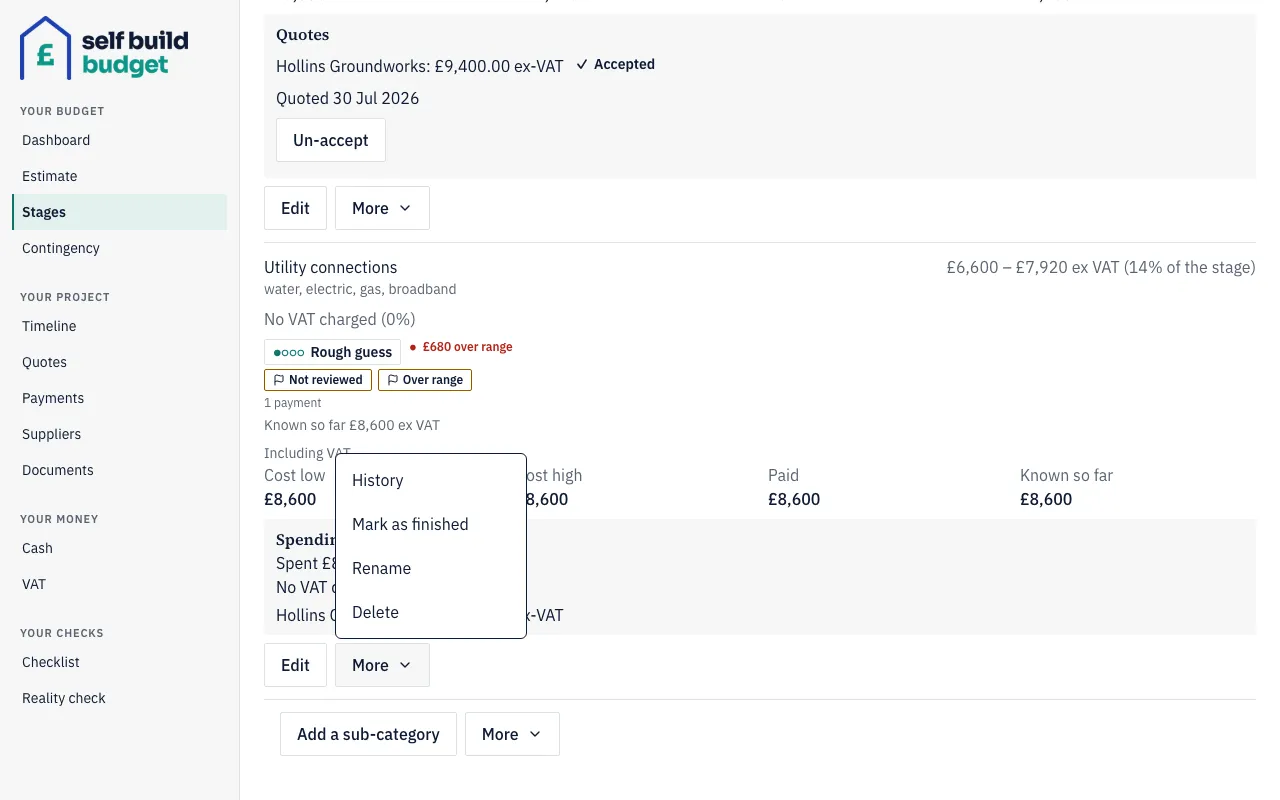
- Choose Mark as finished.
- If the app asks whether anything is still to pay, read the question. It appears when you’ve paid less than your accepted quotes, and you can still confirm if nothing is left to pay.
- Confirm.
The line now shows what you paid, for example “Paid £31,850”, with the Actual badge. Its earlier range and level are kept in its history. To see them, choose More on the line, then History.
To reopen a finished line:
- Go to Stages and find the finished line.
- Reopen the line from its actions.
- Write a note giving the reason. You must add one.
- Confirm.
The line goes back to the level and figures it had before you finished it. In the sample project, Kitchen returns to Firm at £32,500.
Good to know
- Actual means finished, and the figure is what you paid. You can reopen it if you give a reason.
- If you’ve accepted more in quotes than you’ve paid, the app asks, for example: “You’ve accepted £32,500 of quotes but paid £31,850. Is anything still to pay, such as retention or a final invoice?” Use it as a prompt to check for a final invoice or retention.
- The note you write when reopening is visible to anyone with access to the project, including viewers. The app tells you this when you add it.
- If you record a payment against a finished line, the app asks “This line is marked finished. Reopen it?” If you decline, the payment is still recorded and the line stays Actual at the new total paid.
- The contingency lines have no Mark as finished option.
- A finished line that cost less than its range can bring your cost range down.
The figures in this article are a guide, not financial or tax advice.
Who can do this
Owners and partners can mark a line finished and reopen it. Viewers can see the Paid figure, the Actual badge and the reopen reason, but can’t finish or reopen a line.
On Free, this page is locked. See what each plan includes