

Why your budget is a range
PlanAll plans, including Free
A single figure for a build cost looks tidy, but it claims a certainty nobody has before the work is done. Self Build Budget gives each line a low and a high, then adds them up to a cost range, so your totals show how sure you are. Your budget is different: it is one figure that you lock, never a range.
Steps
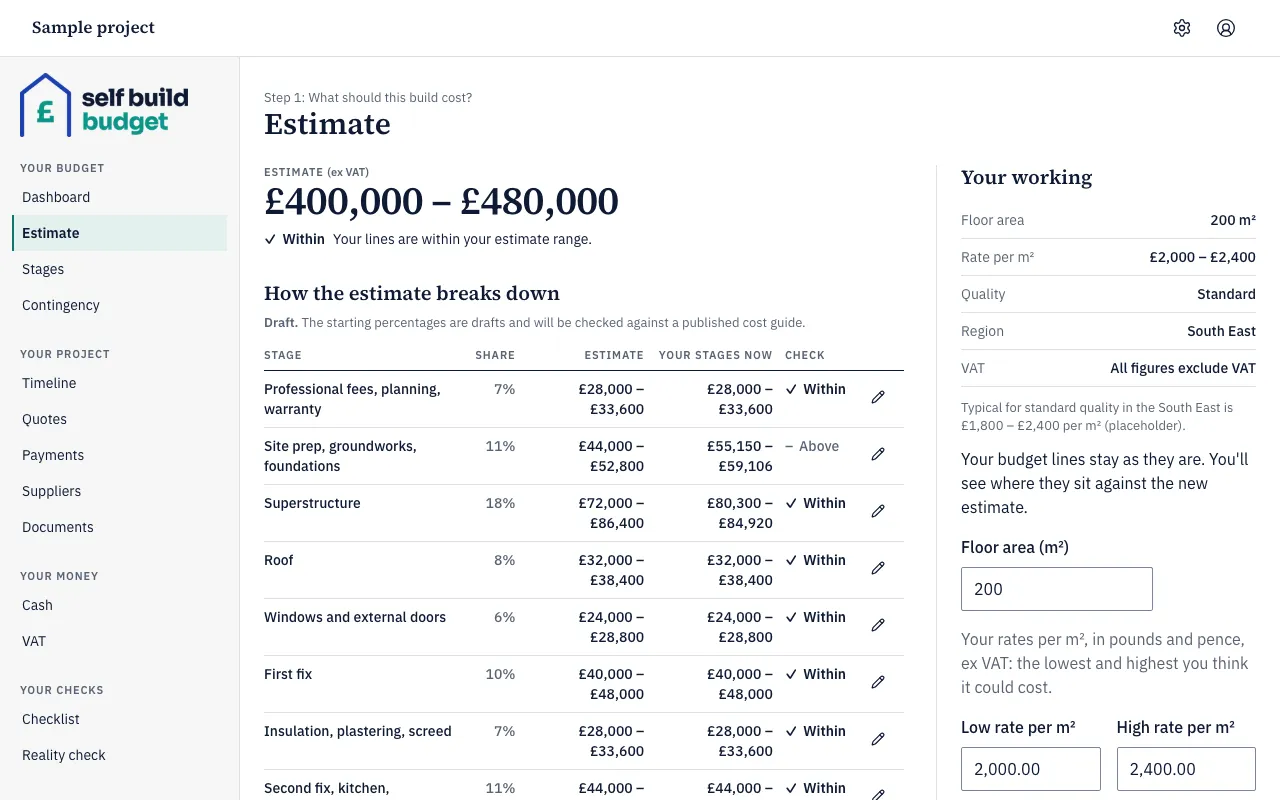
- Open the Estimate page. On a desktop, choose Estimate in the menu on the left. On a phone, tap the Budget tab at the bottom of the screen, then the Estimate tab at the top.
- Look at the figure under Estimate (ex VAT). It is a range because it comes from a Low rate per m² and a High rate per m². In the example, 200 m² at £2,000.00 and £2,400.00 gives £400,000 to £480,000.
- Open the Stages page. On a desktop, choose Stages in the menu on the left. On a phone, tap the Budget tab at the bottom, then the Stages tab at the top.
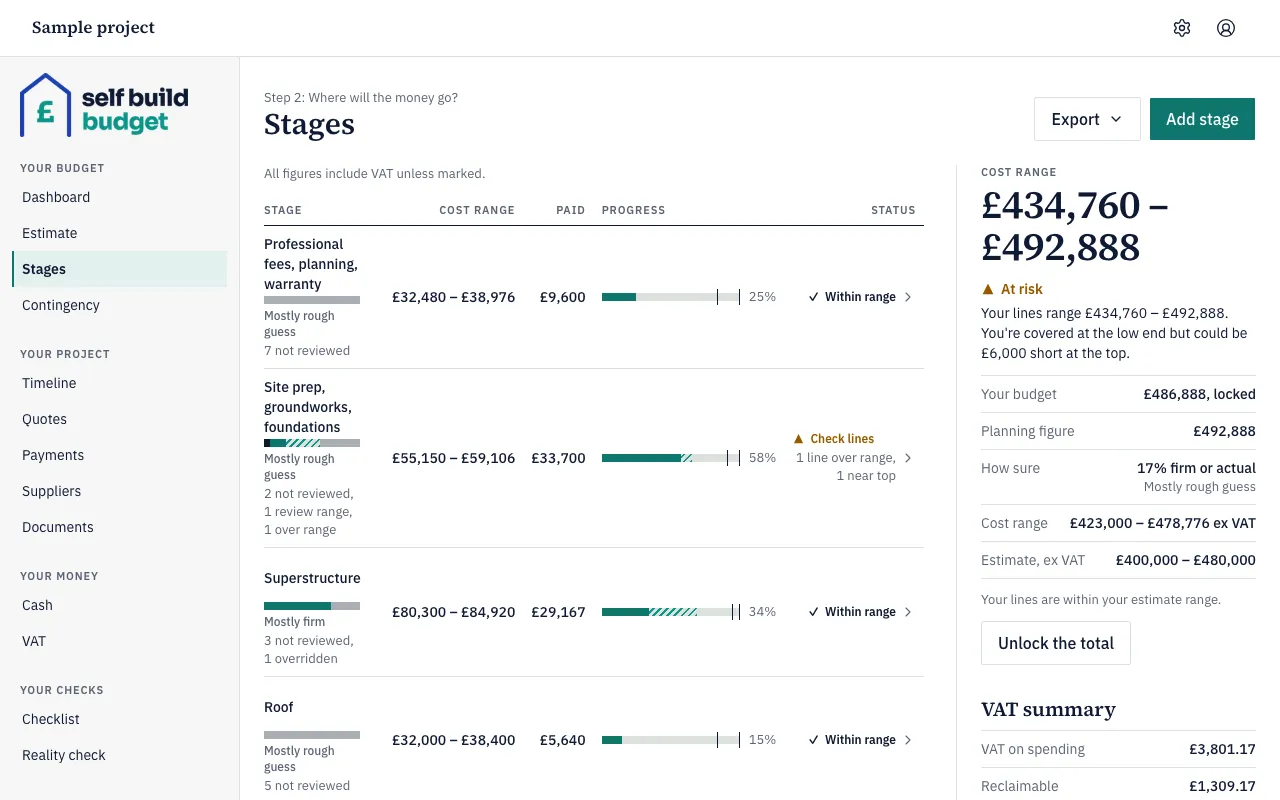
- Read the Cost range column. Each stage shows its low and high, including VAT. A stage’s low and high are the sums of its lines’ lows and highs. In the example, Superstructure is £80,300 to £84,920.
- Look under each stage name and in the Status column. A label such as “Mostly rough guess” or “Mostly firm” shows how sure the stage’s figures are. A status such as Within range or Check lines shows whether anything has gone over.
- Read the panel on the right. In the example, Cost range is £434,760 to £492,888 and Planning figure is £492,888. Your budget is £486,888, locked. The panel shows At risk because the budget covers the low end but could be £6,000 short at the top.
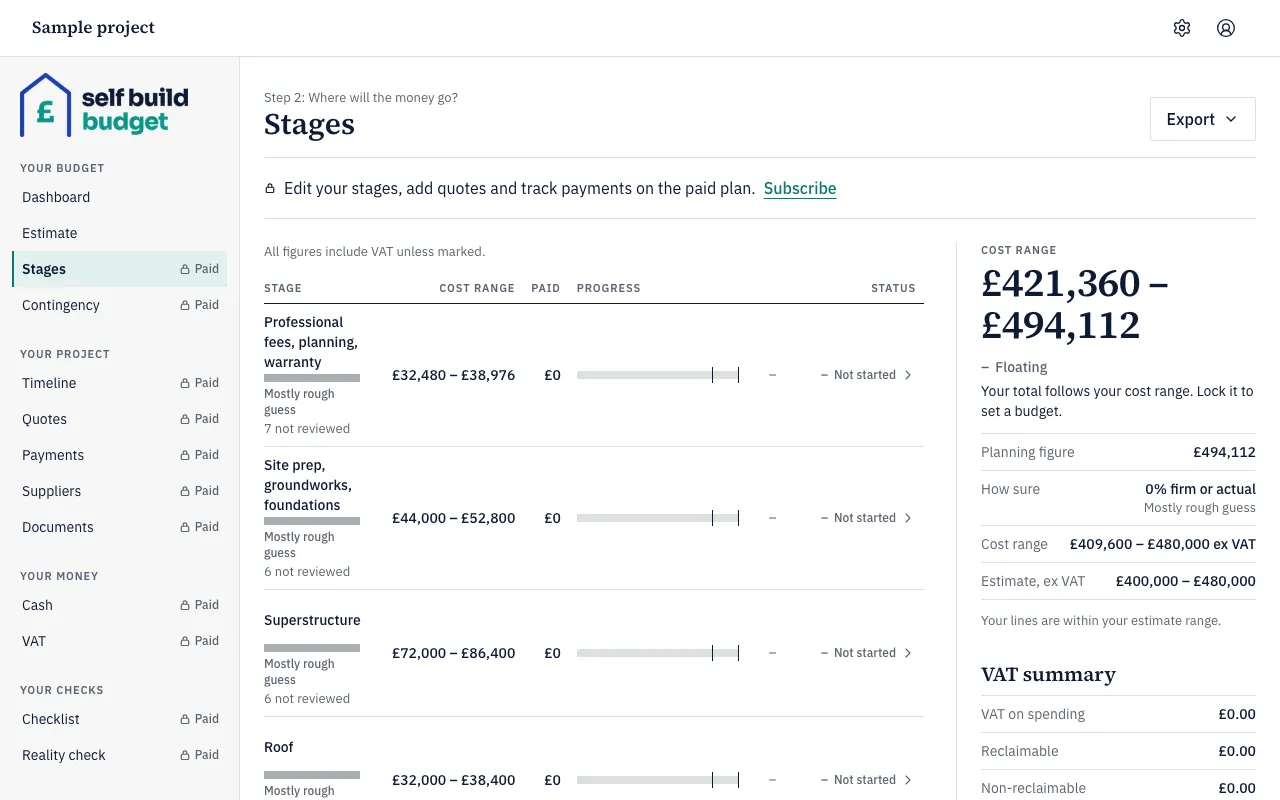
- On Free, Stages opens as a read-only preview of your own stages and lines, with a lock beside it. Editing stages needs Standard. The total shows Floating until a budget is locked. The Dashboard on Free also shows Cost range, Planning figure, Your budget and How sure. See Read your Dashboard.
Good to know
- One figure hides the spread. A kitchen guessed at £25,000 to £40,000 ex VAT shows as £30,000 to £48,000 including VAT. A single £30,000 would hide how far it could go. Each line also shows its range ex VAT, marked “ex VAT”.
- Reality moves the range. Payments and accepted quotes above a line’s high push its cost range up, and the line is marked as over range. For example, a drainage line guessed at £8,000 to £12,000 with £12,900 of accepted quotes becomes £12,900 to £12,900. The range can also fall, for example when you lower a line’s figures or a variation reduces a quote.
- The planning figure is the top of the whole project’s cost range. A line or a stage doesn’t have one. For example, a cost range of £410,000 to £480,000 has a planning figure of £480,000. The app uses it wherever a single number is needed, such as the cash flow and exports.
- Your budget is one figure, including VAT, that you lock. Until you lock it, the total follows your cost range. See Lock or float your budget.
- Check the VAT basis. Estimate figures exclude VAT. Stages figures include VAT unless marked.
- How sure tells you how much weight to give a line’s range: Rough guess, Quoted, Firm or Actual. A line marked Not reviewed still holds the starting figures from your estimate. See How sure: Rough guess, Quoted, Firm and Actual.
The figures in the app are a guide, not financial or tax advice.
Who can do this
Owners, partners and viewers can all read the ranges: everyone sees the same cost ranges, How sure levels and statuses on Estimate and Stages. Owners and partners can change the estimate, and the lines where their plan allows it. Viewers can’t change anything.